What is a Credit Data Report?
A credit data report is an official document from the Bank of Israel's credit data system. It provides us with information about all our obligations such as activity history like loans not paid on time, checks drawn from the account and whether there were returns and more.
It is a tool used by many financial institutions to assess the quality of the customer as well as their existing debts, especially in cases of loans to repay existing loans.
Why is this Report Important?
- Getting a Mortgage: Banks require this report as part of the mortgage approval process
- Loans: Other financial institutions also use the report to approve loans
- Personal Financial Management: It's advisable to check from time to time that the information is correct and no issues appear
- Identifying Problems: Sometimes errors appear that need to be corrected
Method A: Phone Order - 6194*
The simplest and fastest way:
- Call 6194*
- Follow the voice instructions
- You will need personal details (ID number, contact information)
- The report will be sent to you by email within minutes to an hour
Method B: Download from Website
Step 1: Enter the Website
Go to the Credit Data Bureau website: https://creditdata.org.il
Step 2: Login
Click on the "Login" button at the top left

Step 3: Login to Personal Area
Select "Login to Personal Area" and log in using:
- Login with password (if you have an account)
- Login using a one-time code to phone

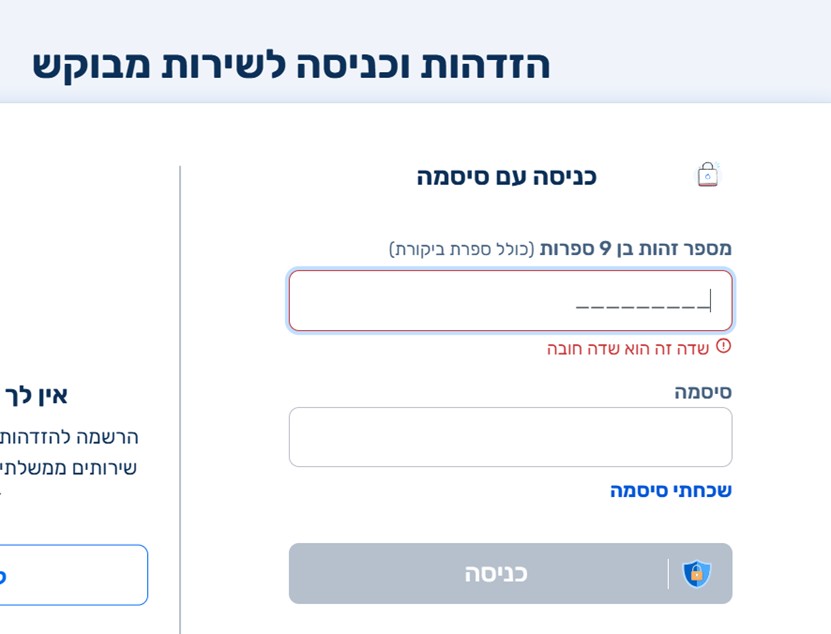
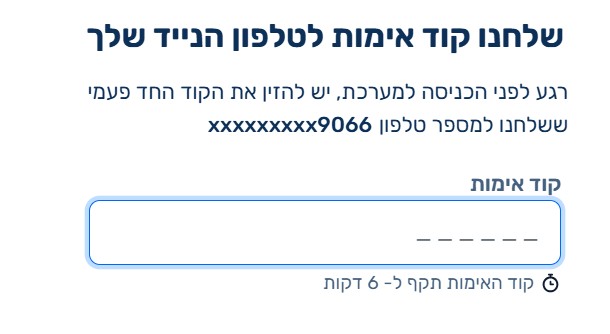
Step 4: Open Menu
After logging in, click on the three lines (hamburger menu) at the top right

Step 5: Select "Actions"
From the menu, select the "Actions" option

Step 6: Order Report
Click on "Order Report"

Step 7: Select Report Type
Choose the first type of report: "Data Summary Report" and click "Confirm"


Step 8: Receiving the Report
The report will arrive within a few minutes to an hour to the email you specified during registration
What Does the Report Include?
The credit data report includes extensive information:
- Personal Details: Name, ID number, address
- Existing Debts: Mortgages, loans, credit cards
- Payment History: Whether there were payment delays
- Bounced Checks: History of checks that were not honored
- Current Accounts: Information about your bank accounts
- Credit Requests: Applications made to various financial institutions
Important Tips
Check the Report Before Getting a Mortgage
It's recommended to order a credit data report a few weeks before you plan to submit a mortgage application. This way you can fix problems if there are any.
Periodic Check
It's advisable to order a report once a year to ensure all information is correct and no errors or problems appear that you're not aware of.
Right to Correction
If you found an error in the report, you have the right to request correction. Contact the Credit Data Bureau or the entity that reported the incorrect information.
Free Report
You are entitled to receive a credit data report for free once a year. Additional reports may cost money.
What to Do If There Are Problems in the Report?
If you discovered problems in your credit data report:
- Identify the Problem: Is it an error or a real debt that needs to be addressed
- Contact the Reporting Entity: If it's an error, contact the bank or financial institution that reported it
- Request Correction: Submit an official request to correct the error
- Follow the Process: Ensure the correction was actually made in the report
- Handle Debts: If there are real debts, address them before submitting a mortgage application
Frequently Asked Questions
How long does it take to receive the report?
Usually within a few minutes to one hour.
Does my check affect my rating?
No. Self-checking the credit data report does not affect your rating.
How long is information stored in the report?
Usually 7 years, but it depends on the type of information. Paid debts will remain in the report for a certain period.
What if I don't agree with the information in the report?
You have the right to file an objection and request a re-examination of the information.
Summary
A credit data report is an important tool in proper financial management and in the process of getting a mortgage. Make sure to check it from time to time, correct errors if there are any, and address problems before submitting a mortgage or other loan application.
Good luck!