A mortgage is a loan that it is recommended to review every few years. Why, actually? What was right for us in the past may be less suitable today. The property value has gone up, income has changed, interest rates and more.
And therefore – it may be worth refinancing the mortgage (Michzur Mashkanta). It could be worth tens or even hundreds of thousands of shekels to us!!
And to check whether refinancing is worthwhile – you need to get a loan payoff statement (Doch Yitrot LeSiluk). All the other ways (screenshots etc.) give only partial information, and it is hard to make decisions based on that information.
The guide below explains in detail how to get such a statement from the main banks.
The full statement can only be produced from a computer, not from a phone!
Mizrahi
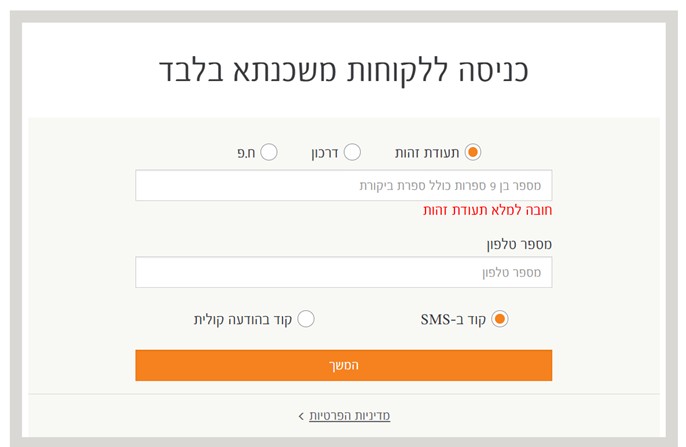
If we are Mizrahi customers: log in to the account
If not, and we only have a mortgage with them – log in here
And then you get this:
And after that, this:
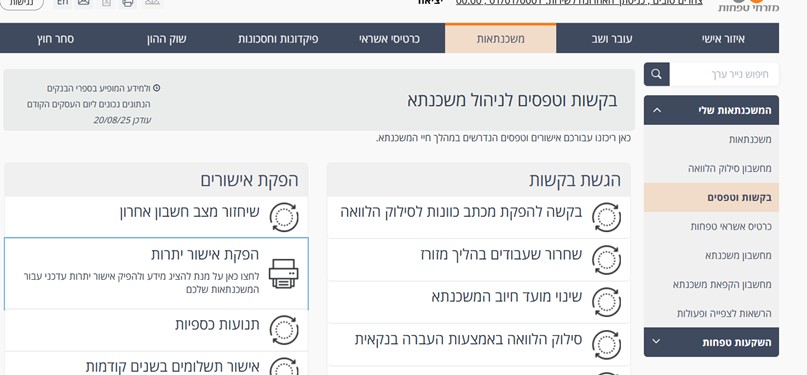
Click "Mortgages"
"My mortgages"
"Requests and forms"
"Produce a balance confirmation"
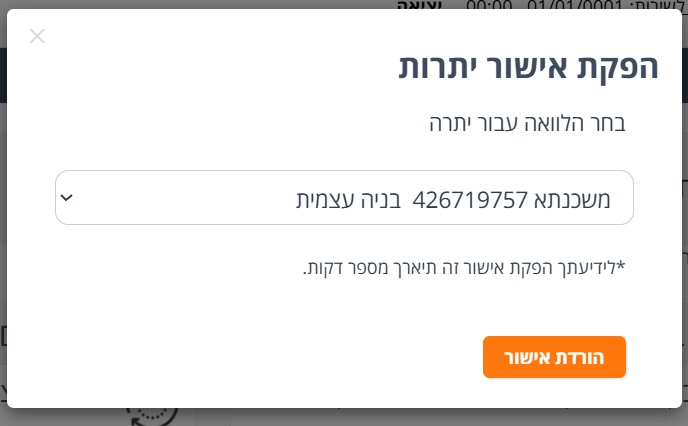
And then you get the following screen:
Click "Confirm"
Wait 5-10 seconds
And you get a statement to download.
Hapoalim
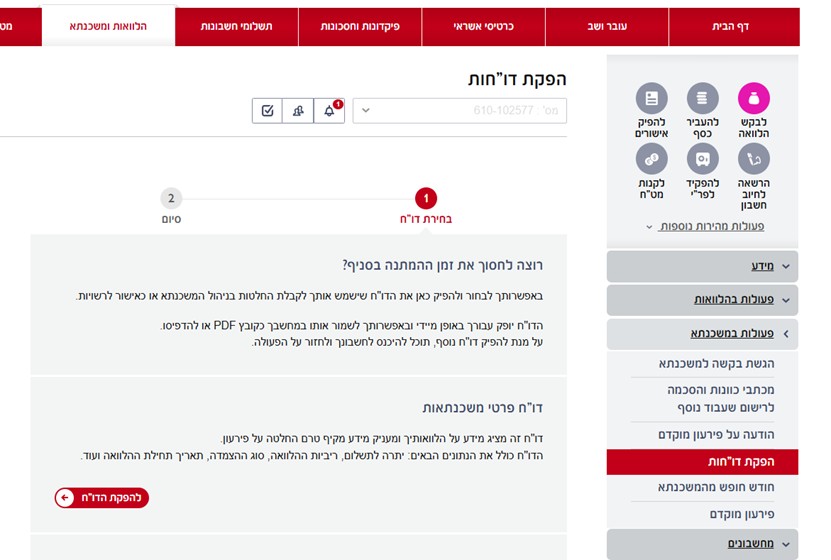
Log in to the account
Choose "Loans and mortgages"
"Mortgage actions"
"Produce reports"
"Mortgage details report"
Leumi
I don't have screenshots at the moment, but the principle is very similar:
Log in to the account
Open the menu on the right-hand side
Click on: "Loans and mortgages"
Choose: "Order mortgage documents"
In the screen that opens, order the document "Confirmation of balances for payoff"
The document will arrive on the next business day in the personal mailbox on the website
Discount and Mercantile
Log in to the account
Menu on the right-hand side: "Mortgages"
A button appears: "Full mortgage details including payoff balance I printout)"
You get the statement to save on your computer
Other banks
Contact the call center
Igud:
Contact the call center
Phone: 03-6251009, 09:00-15:00
Mortgages: 1-700-700-185, extension 2, 08:00-18:00
Massad: 3533*, 08:00-18:00
Otsar Ha-Hayal: 1-700-700-185, extension 2, 08:00-18:00
PAGI: 3360*, 08:00-18:00
Jerusalem: 5726*, Sun Mon Tue 08:30-15:30. Wed Thu 09:00-14:00, 16:00-18:00, Fri 09:00-12:00
Clal Mimun: 03-6251009, 09:00-15:00